
From Concordance to Claude: I’ve Been Tinkering with Legal Tech My Whole Career. AI Finally Lets Me Build.
A career's worth of workarounds, admin panel deep dives, and duct-taped integrations finally has somewhere to go.

The first computer I ever touched had a black screen and a white cursor.
I was a kid. My parents brought home an IBM, and there was no desktop, no icons, no mouse. Just C:\> and whatever you could figure out how to type after it. MS-DOS. A blinking line that either did what you told it or threw an error with zero explanation for why.
I didn’t know what an operating system was. I didn’t know what a command line was. I just knew that if I typed the right thing, something happened. And if I typed the wrong thing, I learned what not to type next time.
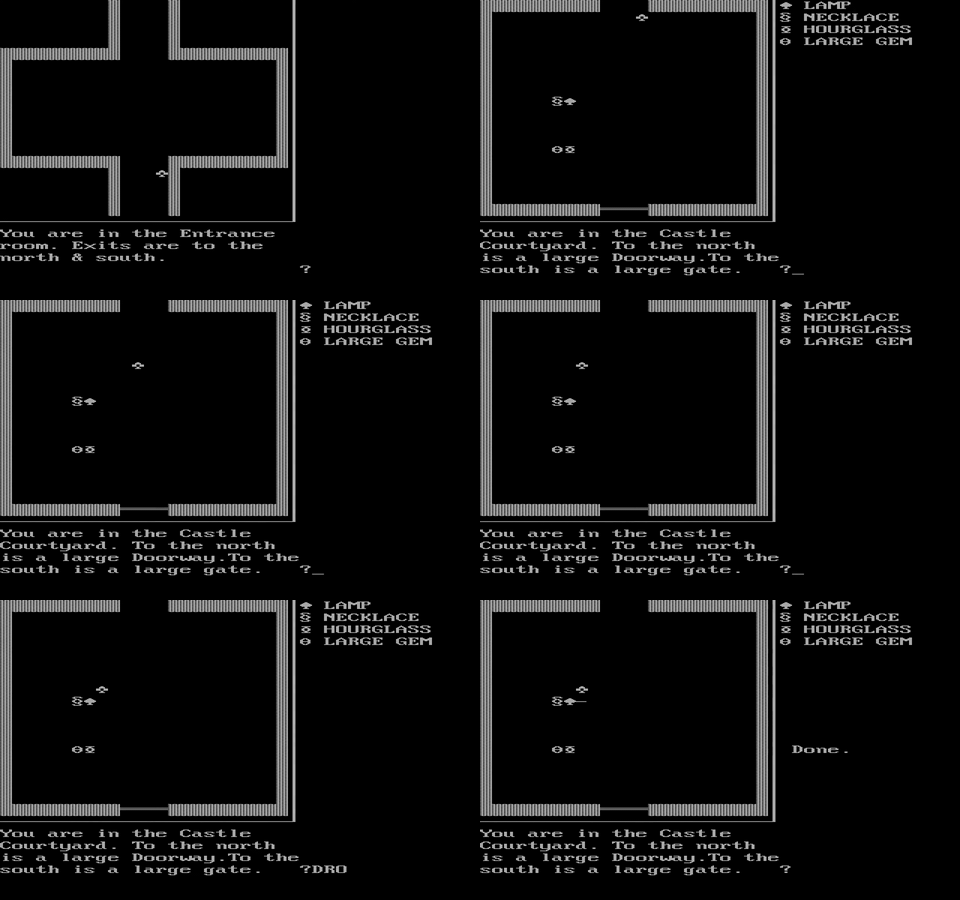
I played a game called Castle Adventure. Pure ASCII art on a monochrome screen. Rooms drawn out of block characters and line glyphs. Your character was a little clover symbol navigating corridors, and the monsters chasing you were smiley faces. Actual smiley faces. You typed commands like “GET SWORD” and “SHOW CROSS” to repel a vampire, and you moved room to room through gaps in the walls. There was no health bar, no save system that worked, no tutorial. If you died, you started over.
A 14-year-old kid named Kevin Bales wrote the whole thing in his mother’s basement in 1984. It shipped on floppy disks passed around through bulletin board systems. It was crude, it was frustrating, and something clicked in that moment that I’ve carried my entire career: the machine does what you tell it. The question is whether you know what to tell it.
That was the last time a computer felt fully open to me for a long time.
The layers started stacking.
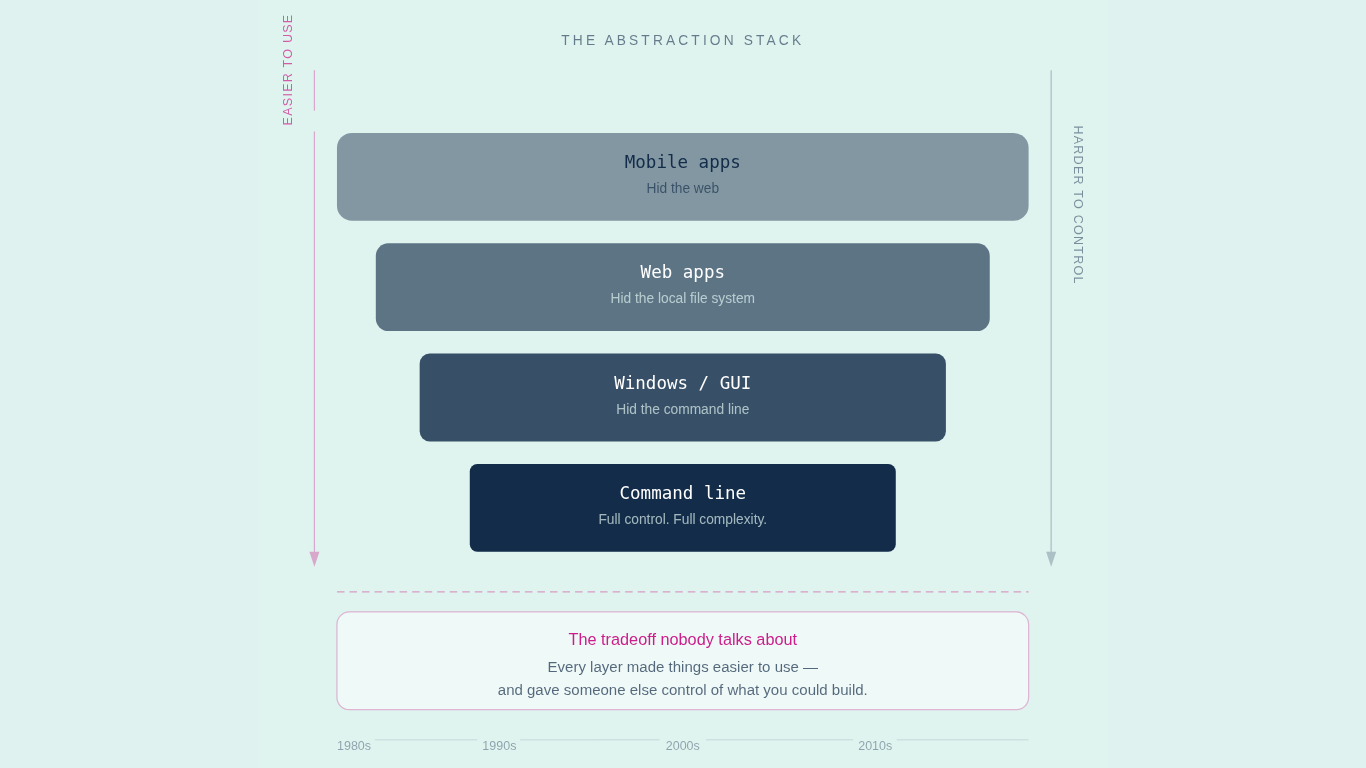
Windows arrived. Then the web. Then mobile. Each one made computers easier to use. Each one also made them harder to control.
This is the tradeoff nobody talks about. Every abstraction layer in computing exists to hide complexity from the user. GUIs hid the command line. Web apps hid the local file system. Mobile apps hid the web. And every time a layer got added, the people who built it decided what you could and couldn’t do. The menus, the buttons, the features, the workflows. All designed by someone else, for someone else’s idea of what you needed.
Joel Spolsky nailed it in 2002: all non-trivial abstractions are leaky. They save you time working, but they don’t save you time learning. And when they break, if you don’t understand what’s underneath, you’re stuck.
I watched this play out in legal in real time.
If you practiced law in the last 20 years, you lived through every one of these layers.
E-discovery went from Concordance to Relativity. If you’re old enough to remember Concordance, you remember the experience. It had a GUI, technically. A Windows desktop app with menus, toolbars, and resizable panes. But “graphical” is generous. The interface looked and felt like a database application from the late 1990s, because that’s exactly what it was.
But the search engine was legitimately powerful. Boolean operators, proximity searches, wildcard characters. If you learned the syntax, you could find anything. The problem was that learning the syntax was its own full-time job, and the tool fought you on everything else.
Then Relativity came along. Web-based. Browser-accessible. Designed so a new reviewer could be productive in minutes instead of days. It added analytics, predictive coding, email threading. It scaled to billions of records where Concordance topped out under a million. By the 2022 ABA survey, Relativity held 43% of the market. Concordance had dropped to 12.7%, marketed mainly as a repository for archived matters.
Easier to use. More polished. And also: more locked in. You worked inside Relativity’s workflows, Relativity’s review paradigm, Relativity’s pricing model. Which oh by the way … Relativity is now asking you to host in their cloud. More lock-in.
Document management followed the same arc. Hard copy files gave way to iManage, NetDocuments, FileSite. Physical filing was chaos, but it was your chaos. You could organize it however your brain worked. The digital systems imposed someone else’s logic. Folder structures, metadata schemas, naming conventions, and version controls designed by a product team that had never seen your workflow.
Time entry went from tracking hours in a spreadsheet to systems like Intapp. More structure, better reporting, less flexibility. The tool got smarter. You got more constrained.
Every single one of these transitions followed the same arc. Easier to use. Harder to bend.
I was always the person trying to bend them.
Not because I wanted to break things. Because the tool never quite fit. The workflow it assumed wasn’t my workflow. The report it generated wasn’t the report I needed. The integration it offered wasn’t the integration that would actually save time.
So I’d tinker. I’d find the workaround. I’d build a macro in the spreadsheet that did what the system wouldn’t. I’d string together three tools to cover the gap that the vendor kept promising they’d close in the next release. I’d find the settings menu nobody else opened and make the software do something it technically could do but wasn’t designed to surface.
I know I’m not the only one. Every legal team has this person. The one who builds the intake tracker in Excel because the matter management system’s intake module doesn’t match how work actually comes in. The one who writes the Outlook rule that auto-sorts client emails because the DMS integration is six months behind. The one who finds the back door.
That instinct is what I’m talking about when I talk about builders. Not software developers. Not engineers. People who see a gap between what the tool does and what the work requires, and close it themselves.
But there was always a ceiling.
The ceiling was code.
You could tinker all day. You could push a spreadsheet to its absolute limit with nested formulas and conditional formatting. You could configure a system until you knew the admin panel better than the vendor’s support team. But eventually you’d hit the wall. The thing you needed required actual software development. Custom code. An API integration. A script that automated something the GUI never exposed.
And that’s where most people stopped. Not because they lacked the thinking. Because the gap between “I know exactly what this should do” and “I can make it do that” required a skill set that took years to develop. You needed a developer. Which meant you needed a budget, a project manager, a requirements document, a sprint cycle, and six months of waiting.
Or you submitted a feature request to your vendor and hoped.
Gartner found that 41% of enterprise employees were already building or acquiring technology outside of IT’s visibility. Shadow IT. Not a security failure. A creativity failure. People needed to build, and the tools wouldn’t let them.
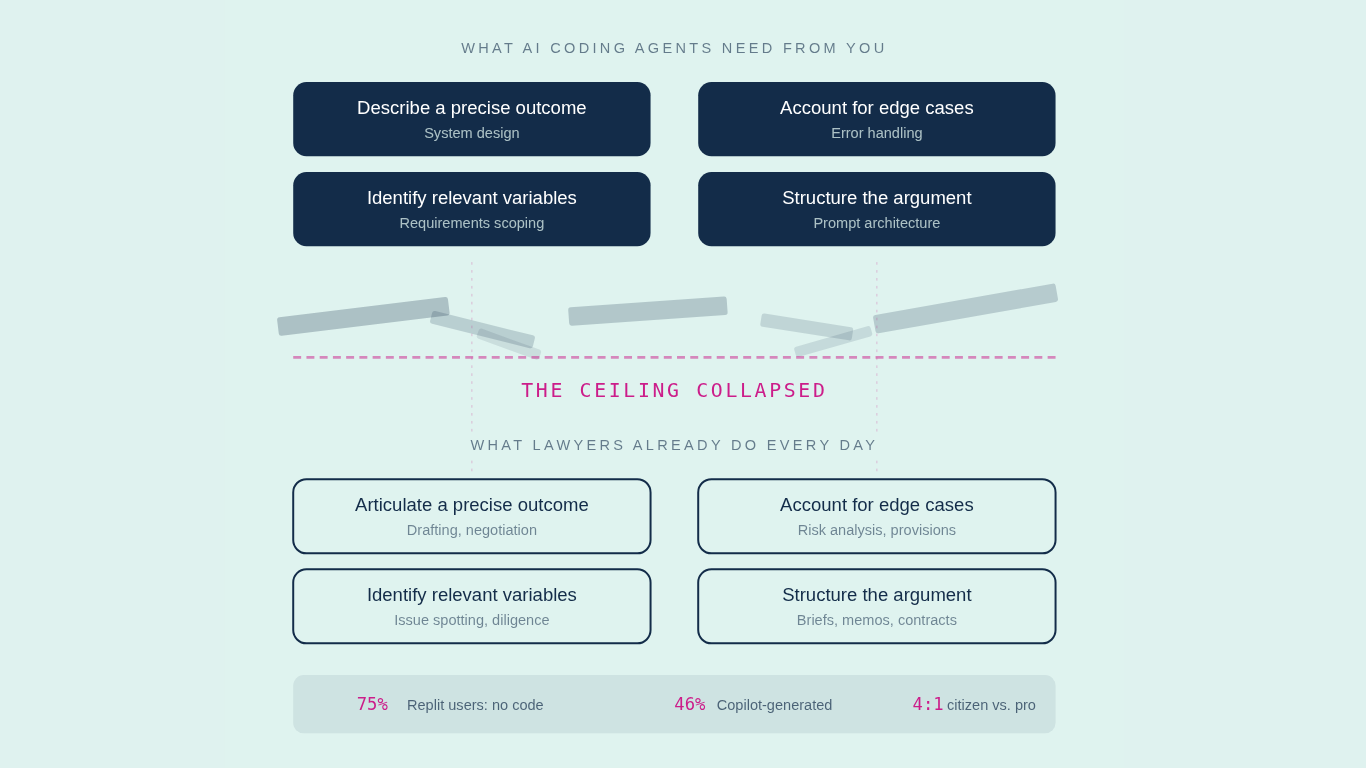
That ceiling just collapsed.
Here’s what changed. AI coding agents don’t add another abstraction layer on top of the stack. They give you a path through it.
Tools like Claude Code, Codex, and GitHub Copilot don’t require you to learn Python or JavaScript. They require you to know what you want and to describe it clearly. That’s a different skill. And it’s a skill that lawyers, specifically, are already good at.
Think about what lawyers do every day. Analyze a complex situation. Identify the relevant variables. Articulate a precise outcome. Structure an argument that accounts for edge cases. That’s prompting. That’s system design. That’s exactly what an AI coding agent needs from you.
The numbers are already proving it out. Seventy-five percent of Replit’s users never write code. They describe what they want. A quarter of Y Combinator’s recent startup cohort has codebases that are 95% AI-generated. GitHub Copilot now has 20 million users, and its active users report that it generates 46% of their code. Gartner projects citizen developers will outnumber professional developers 4:1 at large enterprises by the end of this year.
This isn’t about replacing developers. It’s about what happens when the ceiling lifts.
Take something as simple as Google Sheets. You’ve used it. You’ve probably hit its limits. You know there are things you want the spreadsheet to do that formulas can’t handle.
Google Sheets has a built-in tool called Apps Script. It’s JavaScript that lives inside the spreadsheet and works like code. It can send emails, connect to APIs, generate documents, sync across services. Before AI, using it meant learning to program. Now, you describe what you need in plain English, an AI writes the Apps Script, and you paste it in. A capability that was walled off behind code is suddenly yours.
That’s one spreadsheet. Now multiply it across every tool your legal team uses. The contract tracker that should flag renewal dates and notify the business owner. The intake form that should auto-route based on matter type and risk level. The NDA playbook that should update itself when the template changes. The outside counsel report that should pull from three systems and land in someone’s inbox every Monday.
All of those are buildable. Right now. Without a developer. By the person who understands the work best.
The vendors know this is happening.
TechCrunch reported this month that investors have been selling SaaS stocks since late January. They’re calling it the SaaS-pocalypse. The economics of “pay us monthly and wait for the features you need” start breaking down when the end user can just build the feature themselves.
A marketing team at AppDirect built 11 projects without engineering involvement, saving over $120,000 in software costs. The low-code market is projected to reach $44.5 billion by the end of this year.
The abstraction tax. That’s what it was. Every layer that made software easier to use also made it more expensive to escape. For decades, you paid it because you had no alternative.
Now you do.
The instinct was never the problem.
I think about that kid sitting in front of the IBM with the white cursor. No menus. No buttons. No guardrails. Just a blinking line and a castle made of ASCII characters, waiting for you to type what you wanted to do next.
That directness got buried under forty years of abstraction layers. Layers that made technology more accessible, yes. But that also trained an entire generation of professionals to believe they weren’t “technical.” That building things with software was someone else’s job. That the right response to a gap in your workflow was to submit a ticket and wait.
The builder instinct didn’t die. It got pushed underground. Into the macros, the workarounds, the admin panel deep dives, the duct-taped integrations that held your team together while you waited for the vendor to catch up.
AI didn’t give you that instinct. You’ve had it the whole time. It shows up every time you look at a tool and think “this should work differently.” Every time you build a tracker that nobody asked for because the existing system doesn’t do what the work requires.
What changed is the ceiling. You don’t need to become a software developer. You need to understand the architecture of what you’re building well enough to describe it clearly. The same skill that made you dangerous in Concordance’s search syntax. The same skill that made you the person who could actually make the tools work.
From C:\> to a Claude Code prompt. The interface looks different. The instinct is the same.
The question isn’t whether you can build. You’ve been building your whole career.
The question is whether you’ll keep tinkering at the edges, or finally build the thing.
PossibLaw. Substack. Podcast. Tools to become a builder.
We run custom training for legal teams who are done watching from the sidelines. Let’s talk.